Instagram Reels Download
Save your favorite Instagram Reels in seconds—fast, free, and in HD quality!
How it moves
Three steps, one file
Paste the link
Copy the share link from the app and drop it into the box above.
Processing
We verify the link and get your file ready.
You save it
Tap the download button to save the file to your device.
- ✓Original resolution, no re-encoding or watermark added
- ✓Works on phone, tablet, and desktop browsers
- ✓No account, no app install, no email required
- ✓Reels stay cached briefly so repeat downloads are instant
Instagram Reels Downloader: Save Reels in Seconds with Fastdlhub
Scrolling through Instagram and found a Reel worth keeping? Fastdlhub lets you download Instagram Reels straight to your phone or computer, no app install needed.
How the Instagram Reels Downloader Works
Using Fastdlhub takes less than a minute:
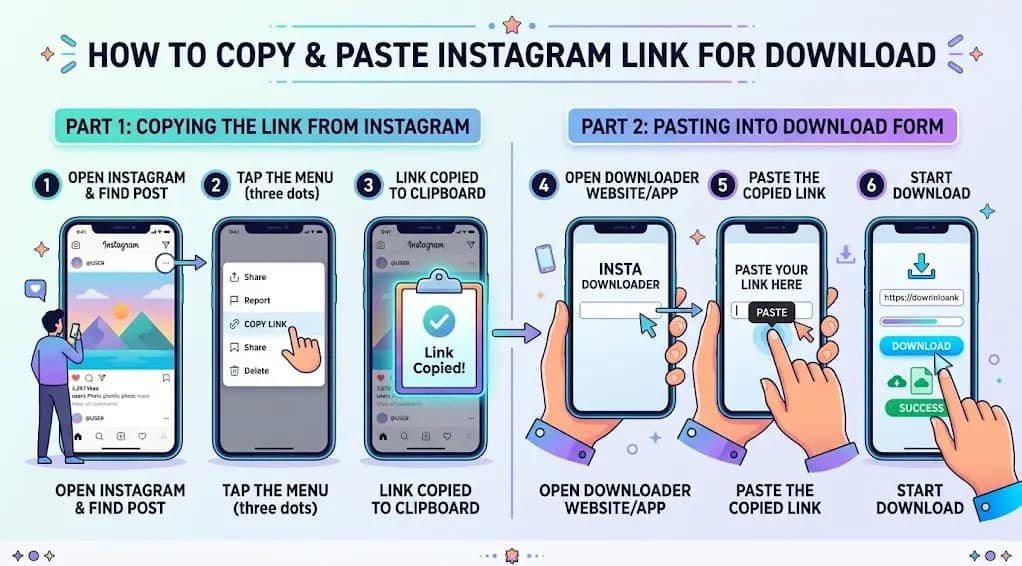
1. Open Instagram and find the Reel you want.
2. Tap the three dots on the Reel and select "Copy Link."
3. Go to Fastdlhub.com and paste the link into the input box.
4. Click the download icon and wait a few seconds while the video processes.
5. Hit "Download" and the Reel saves to your device.
That's it. No account, no watermark, no waiting around for ads to finish.
Why People Use Fastdlhub
Fast processing. Most Reels download in under 10 seconds, even on a slower connection.
Original quality. Videos come through in their original MP4 resolution, not a compressed, blurry copy.
No signup required. You don't need to create an account or hand over an email address to grab a video.
Works everywhere. iPhone, Android, or desktop, the tool runs in your browser, so there's nothing to install.
Downloading Reels on Different Devices
The core steps stay the same no matter what device you're on. What changes is how you copy the link and where the file ends up. On iPhone and Android, downloaded Reels usually land in your Photos or Gallery app. On desktop, check your browser's default Downloads folder.
One thing worth knowing: Instagram's own app has no built-in "save to device" button for Reels, which is exactly why tools like Fastdlhub exist. If a creator's account is private, you won't be able to download their content unless you follow them and get approved.
Bookmark Fastdlhub.com and the next Reel you want to keep is a paste and a click away.
Questions
Before you paste a link
Is this free to use?
Yes — there's no limit on the number of Reels you can save, and no account is required.
Does it work on private accounts?
No. Only Reels from public accounts can be fetched, the same content anyone could already view.
Will there be a watermark?
No. You get the same file Instagram serves, without any watermark added on top.
Why does the download button wait a few seconds?
The short pause lets the server finish preparing a private, single-use link so the file isn't exposed publicly.
What quality will the Reel be saved in?
The same quality Instagram serves the Reel in, usually HD, with no extra compression applied.
Do I need to install an app?
No — everything runs in your browser. No app or extension is required.
Can I download the audio from a Reel separately?
Yes, We also provide audio mp3 file with download results. You do not need use any other audio downloader tools.
How do I get the Reel link to paste here?
Open the Reel in the Instagram app, tap the share icon, then "Copy Link," and paste it into the box above.
Does this work on iPhone and Android?
Yes — it works in any mobile browser on iOS or Android, no matter the device.
Will downloading a Reel notify the original poster?
No. Instagram doesn't notify users when their public content is viewed or downloaded.
Can I download multiple Reels at once?
Each Reel is downloaded individually — paste one link at a time to save each video.
Why does a downloaded link stop working after a while?
Each generated link is single-use and expires for security. Just fetch the Reel again if you need it a second time.